
Nothing kills momentum like dropping a perfect sample into your project and hearing it fight the metronome. Before a chop can sit in a beat, you need two facts: the tempo and the key. Here is every reliable way to get them, from fully manual to one click, and the mistakes each method invites.
Method 1: by ear, with a bar count
The old way still works and it trains your timing. Loop a clean section of the sample, count how many bars pass in a set time, and do the maths: bars multiplied by beats per bar, divided by minutes, gives BPM. Quicker version: tap along with a tap-tempo tool for fifteen seconds and read the average.
For key, play the sample against a keyboard and hunt for the root note that feels at rest, then test whether the third above it is major or minor. This is a brilliant ear-training exercise and a slow way to start a session.
Method 2: inside your DAW
Ableton Live estimates tempo when it warps a clip, and a long clip usually warps close to right. Short chops are where it struggles; a two-bar loop can warp at half or double time and sound convincing either way. There is no native key detection for audio.
FL Studio can detect tempo from a clip (right click a sample in the playlist) and ships Newtone for pitch work, but again key detection for a full mixed sample is on you.
DAW detection is decent when the source is drum-heavy and long. It gets shaky on melodic loops, sparse material and anything under four bars.
Method 3: online databases
If the sample comes from a released track, public databases like SongBPM, Tunebat and GetSongBPM list the BPM and key of millions of songs. Search the artist and title and you often have both answers in ten seconds. Two catches: you need to know what the track is, and database entries are occasionally wrong or listed at double time, so sanity-check the number against what you hear.
Method 4: one click with TEMPO LOCK
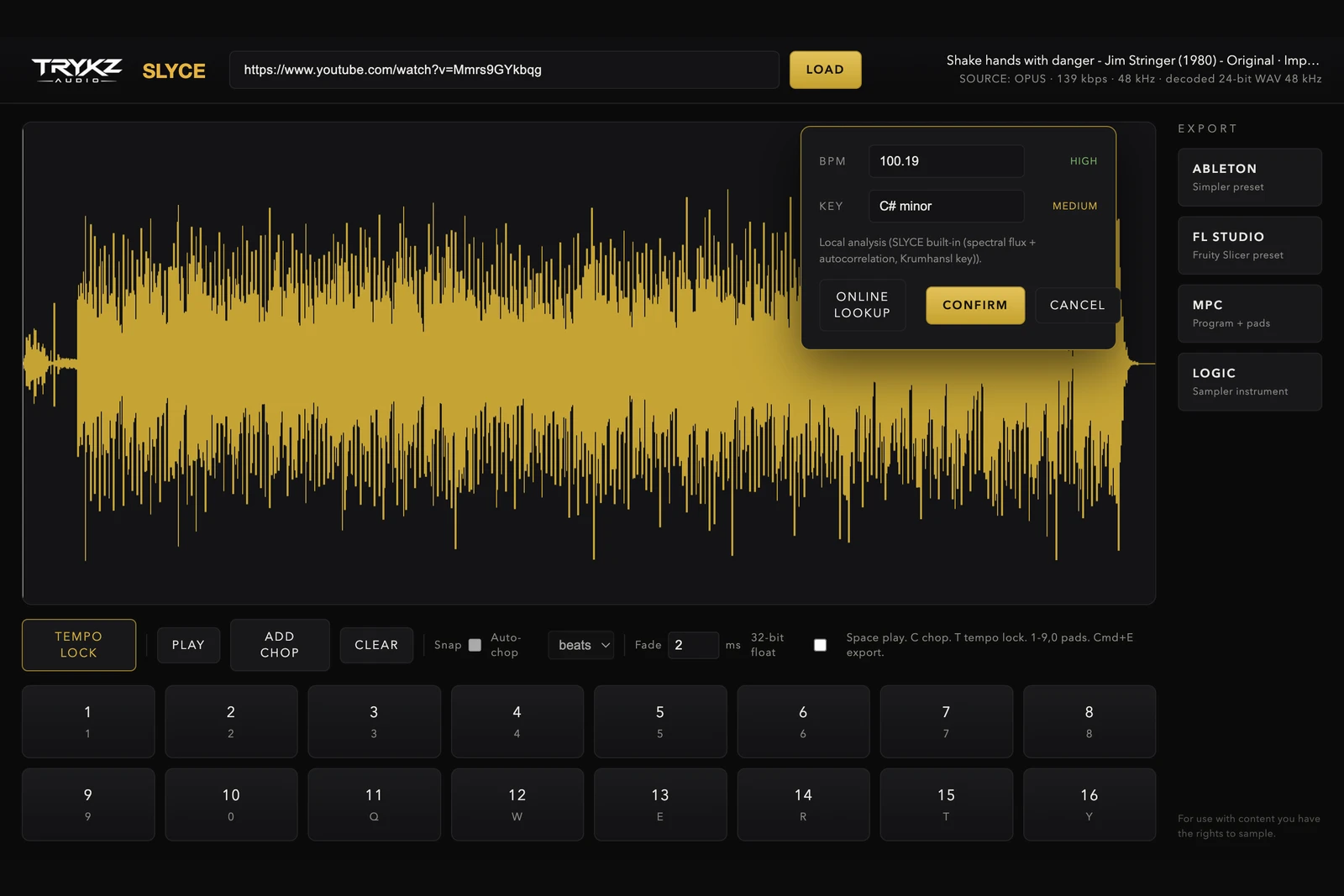
We built TEMPO LOCK into TRYKZ SLYCE to make this whole page one button. Load any audio (a YouTube link you have the rights to use, or your own file) and press T:
Local analysis first. SLYCE analyses the audio on your machine: onset detection for the tempo and downbeat, and a key profile for the musical key. You get the BPM and key with an honest confidence rating on each, High, Medium or Low, because pretending detection is infallible is how double-time errors sneak into beats.
Online cross-check when you want it. One more click and SLYCE queries public BPM databases for the track title and shows you the match with a source link, so a Low-confidence local read can be confirmed against the published number.
You stay in charge. Confirm the detection, or type your own BPM and key. Manual entry always wins, which matters for the half-time and double-time judgement calls only your ears can make.
Once the tempo is confirmed, SLYCE draws the bar grid on the waveform, snaps chops to the beat if you want, auto-chops by 1, 2, 4 or 8 beats, and stamps the BPM and key into every exported file name and preset, so a chop called SLYCE_MyFlip_128bpm_Fm_03.wav never leaves you guessing again.
The double-time trap (read this bit)
Every tempo detector on earth, human ears included, can land on half or double the true tempo, because 85 BPM and 170 BPM produce the same onsets. The fix is musical, not technical: ask what the drums are doing. If the snare feels like it lands on the 2 and 4 at your number, you are right. If it feels like it only lands on the 3, halve it. If it feels frantic, double it. SLYCE showing you its confidence rating, and letting you override in one keystroke, exists precisely for this call.
Detection gets you to the answer fast. Confidence ratings and a manual override keep you honest when the machine is only half right.
TEMPO LOCK ships inside TRYKZ SLYCE (£80, macOS and Windows, perpetual licence) along with waveform chopping, sixteen pads and native exports for Ableton Live, FL Studio, Akai MPC and Logic Pro. If your sample starts life as a link, start with our guide to sampling from YouTube the clean way.