
Every producer has been there. You find a moment inside a track, an old interview, a live jam or one of your own uploads, and you can already hear the flip. The problem has never been the idea. The problem is the twenty minutes of faff between hearing the moment and having it sitting on a pad, in time, in your DAW.
This guide covers the ways producers actually get audio out of a YouTube link and into Ableton Live, FL Studio or an MPC, what each method does to your sound quality, the legal side in plain English, and the fastest clean workflow we know.
First, the rights question, answered honestly
Sampling any recording you do not control needs permission before you release the result commercially. That is true whether the source is vinyl, a streaming rip or a YouTube link. The technology you use to capture audio does not change the legal position of the audio itself.
So what can you sample from YouTube with a clear conscience? More than you might think: your own uploads and stems, collaborations where you hold the rights, content released under licences that allow reuse, sample packs and loops you have bought that creators have demonstrated on YouTube, and material you are flipping privately to build skills. Plenty of producers also chop commercial material as practice and only clear the sample if a release is on the table. Where you draw the line is your responsibility; the honest rule is simple. If you release it, you need the rights to what is in it.
The usual methods, and what they cost you
1. Screen recording or loopback capture
Routing your system audio into a recorder (or just screen recording the tab) works everywhere and needs no extra software on a Mac with a loopback driver. The costs: you capture in real time, so a six minute track takes six minutes; your recording inherits whatever your system volume and any system processing did to it; and you still end up with one long file you have to trim, tempo-find and slice by hand.
2. Converter websites
The endless tab-and-popup sites will hand you an MP3. Quality is the issue: many transcode the stream to a lower bitrate MP3, which means a second generation of lossy encoding stacked on top of YouTube's own. That double hit is exactly the crunchy, smeared top end you can hear in badly sourced samples. You also still have a raw file to trim, analyse and chop.
3. Straight into the DAW
Neither Ableton Live nor FL Studio can open a YouTube link directly, so the usual chain is: capture by one of the methods above, drag the file in, warp or stretch it, find the tempo by ear, then slice. Completely doable, and completely slow. On an MPC you have the extra step of getting the file onto the unit and assigning pads yourself.
The clean way: link to pads in about a minute
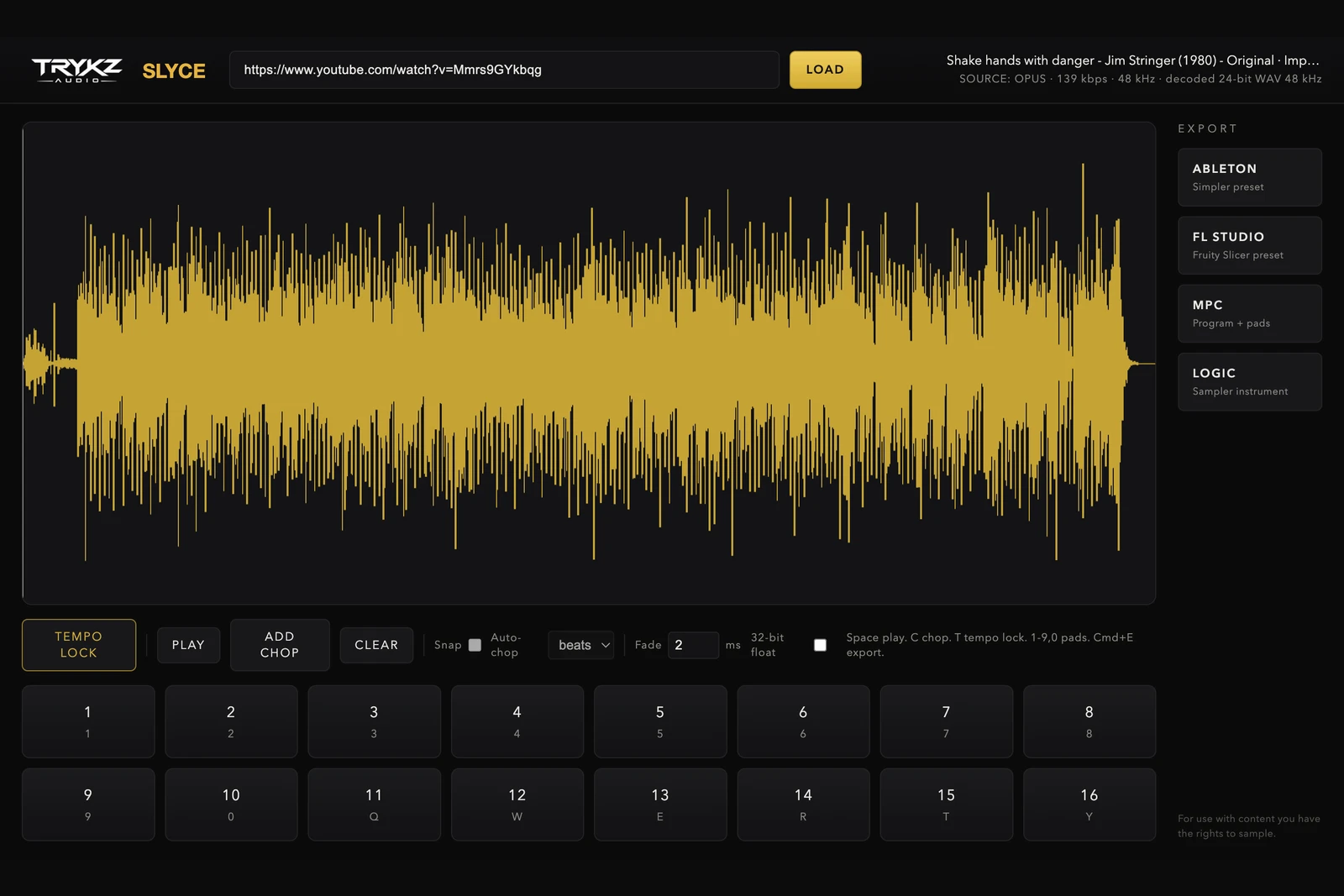
We built TRYKZ SLYCE because that whole chain deserved to be one step. Paste a YouTube link into SLYCE and it pulls the best pure audio stream YouTube serves for that video, skips the video entirely, and decodes it exactly once to 24-bit WAV. No real-time capture, no second lossy encode, no converter tabs. The app shows you the true source quality in the header (for a typical music upload that is around 160 kbps Opus at 48 kHz) so you always know precisely what you are working with. We will not pretend a YouTube stream is lossless, and neither should anyone else; the point is that SLYCE loses nothing beyond what YouTube already did.
From there the workflow is the fun part:
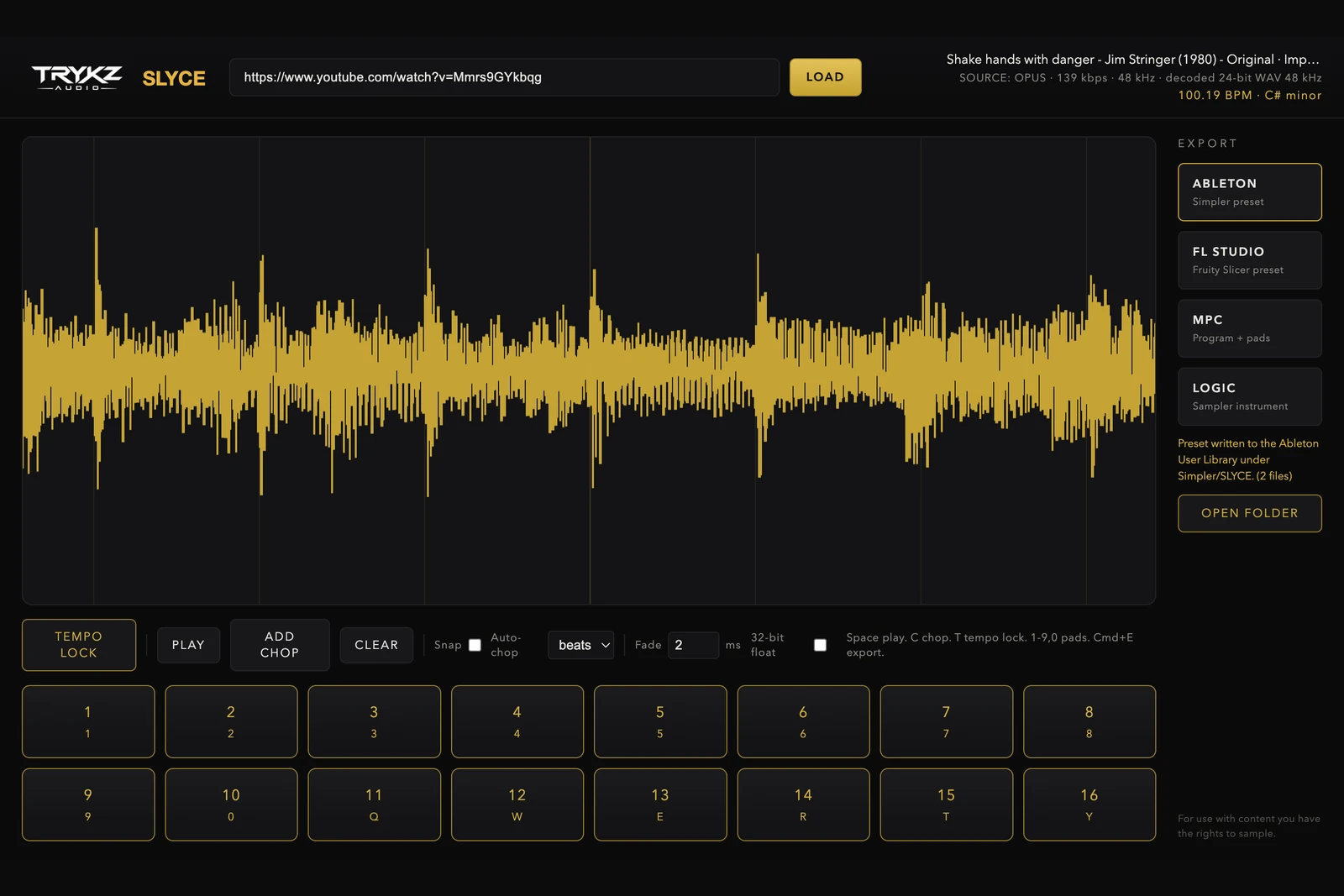
1. TEMPO LOCK. One click detects the BPM, downbeat and musical key with a confidence rating, and an online lookup can cross-check public BPM databases. Confirm it or type your own. Full detail in our guide to finding the BPM and key of any sample.
2. Chop. Click the waveform to place chops by hand, snap them to the beat grid, or auto-chop every 1, 2, 4 or 8 beats. Every chop lands on one of sixteen playable pads. If you want to get properly creative with uneven, off-grid chops, we wrote a whole guide on how to chop samples like a producer.
3. Export to your DAW. One click writes a native preset: an Ableton Simpler preset in Slice mode with warp markers at the confirmed BPM, an FL Studio Fruity Slicer preset, an Akai MPC drum program, or a Logic Pro Sampler instrument, plus sample-accurate 24-bit WAVs named with the tempo and key. Switch to your DAW and it is waiting for you.
Ableton Live notes
SLYCE writes the Simpler preset directly into your User Library under Presets, Instruments, Simpler, SLYCE. Drop it on a MIDI track and your chops are playable immediately, in Slice mode, with the warp tempo already set. No manual warping, no slice-by-transient guesswork.
FL Studio notes (Windows and Mac)
The FL export is a Fruity Slicer channel preset with your exact chop points, one key per chop from C5, plus the source WAV. FL Studio has always been the home of fast beat flips on PC, which is exactly why SLYCE runs on Windows as well as macOS.
MPC notes
The MPC export writes a drum program (.xpm) with one chop per pad in bank order, plus the WAVs, built to the format used by MPC software and standalone hardware. Copy the folder across, load the program, and finger-drum the flip.
Quality: what YouTube actually gives you
A typical music upload on YouTube carries an Opus audio stream at roughly 130 to 160 kbps, 48 kHz. That is genuinely usable for sampling, especially once a chop is sitting inside a busy mix, but every extra lossy step on top of it degrades it further. The rule for the cleanest possible result: capture the original stream once, decode once, and never let an MP3 converter near it. That is precisely the pipeline SLYCE runs, and it is why the app displays the source codec and bitrate instead of hiding them.
And when the source is not YouTube
Everything above works the same when you drop in your own WAV, AIFF, FLAC, MP3 or M4A. Local files keep their original sample rate untouched, so a 96 kHz master stays a 96 kHz master all the way to the exported chops.
The moment of hearing a flip should be about thirty seconds away from playing it on pads. That is the entire idea behind SLYCE.
TRYKZ SLYCE is £80, one payment, perpetual licence, for macOS and Windows. Your licence key arrives by email the moment you buy, and the download is on the downloads page. For use with content you have the rights to sample.